SaaS Pricing Page Layouts for 2026
The best pricing page layout in 2026 is not the most sophisticated one. It is the one that matches your product's go-to-market strategy, your buyer's decision-making pattern, and your conversion goal.
AUTHOR:
IFEMON Studio | Marketing Websites for SaaS Founders
CATEGORY:
Conversion Design · SaaS Growth · UX Strategy
READING TIME:
~14 minutes
DATE:
12th April, 2026
SaaS Pricing Page Layouts: Which Structure Drives More Sign-Ups in 2026?
The Layout Decision That Quietly Controls Your Revenue
A SaaS pricing page is not a formality. It is the last piece of your funnel before a visitor becomes a paying customer — or a bounce. Yet most SaaS teams treat it like a spreadsheet: list the tiers, show the price, slap on a CTA button, ship it.
That approach is leaving conversion points on the table.
In 2026, the highest-performing SaaS pricing pages share one trait: the layout itself is doing psychological work. The structure, the hierarchy, the interactive moments — they all guide a visitor's decision-making before they consciously register what they are reading.
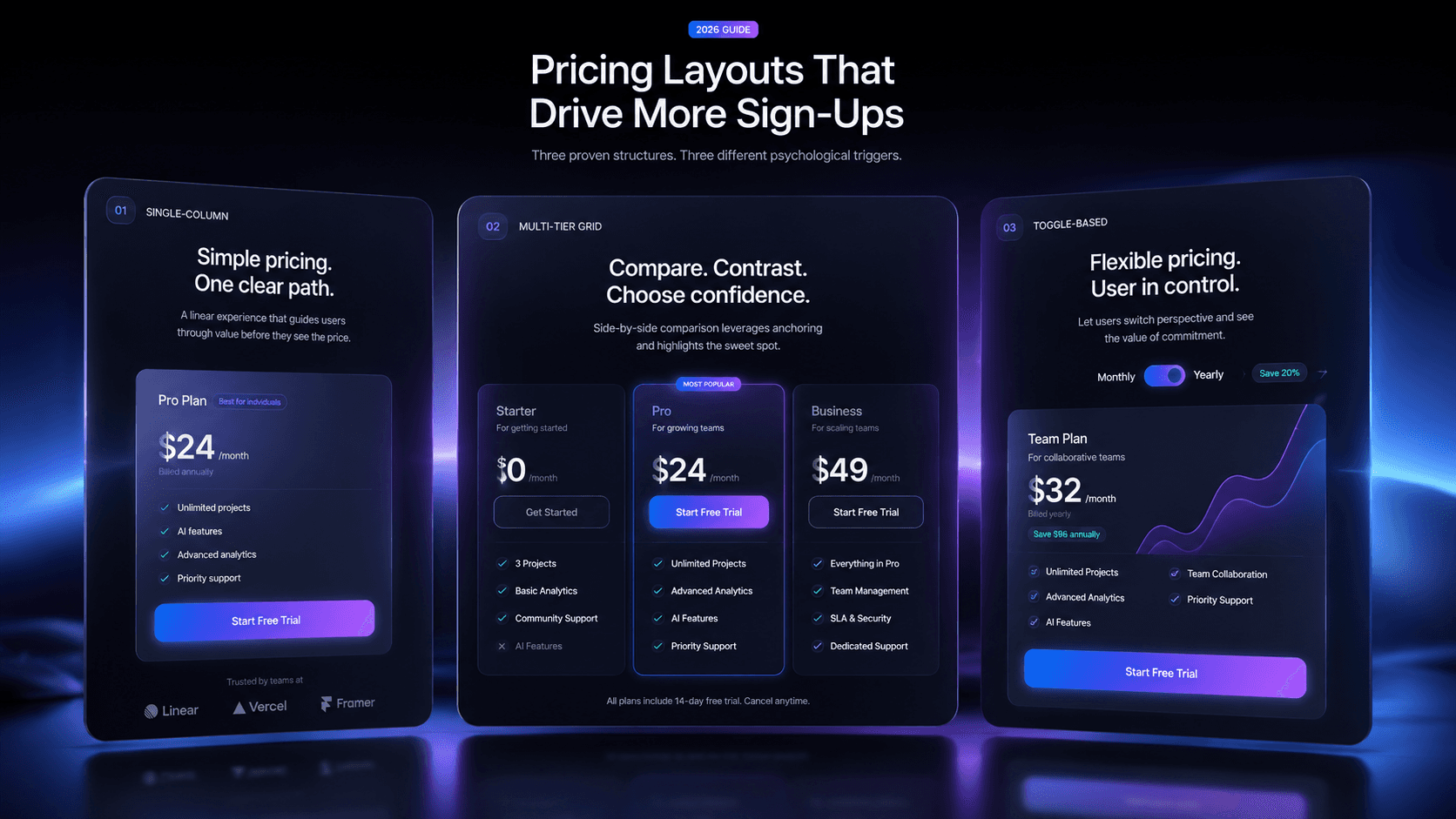
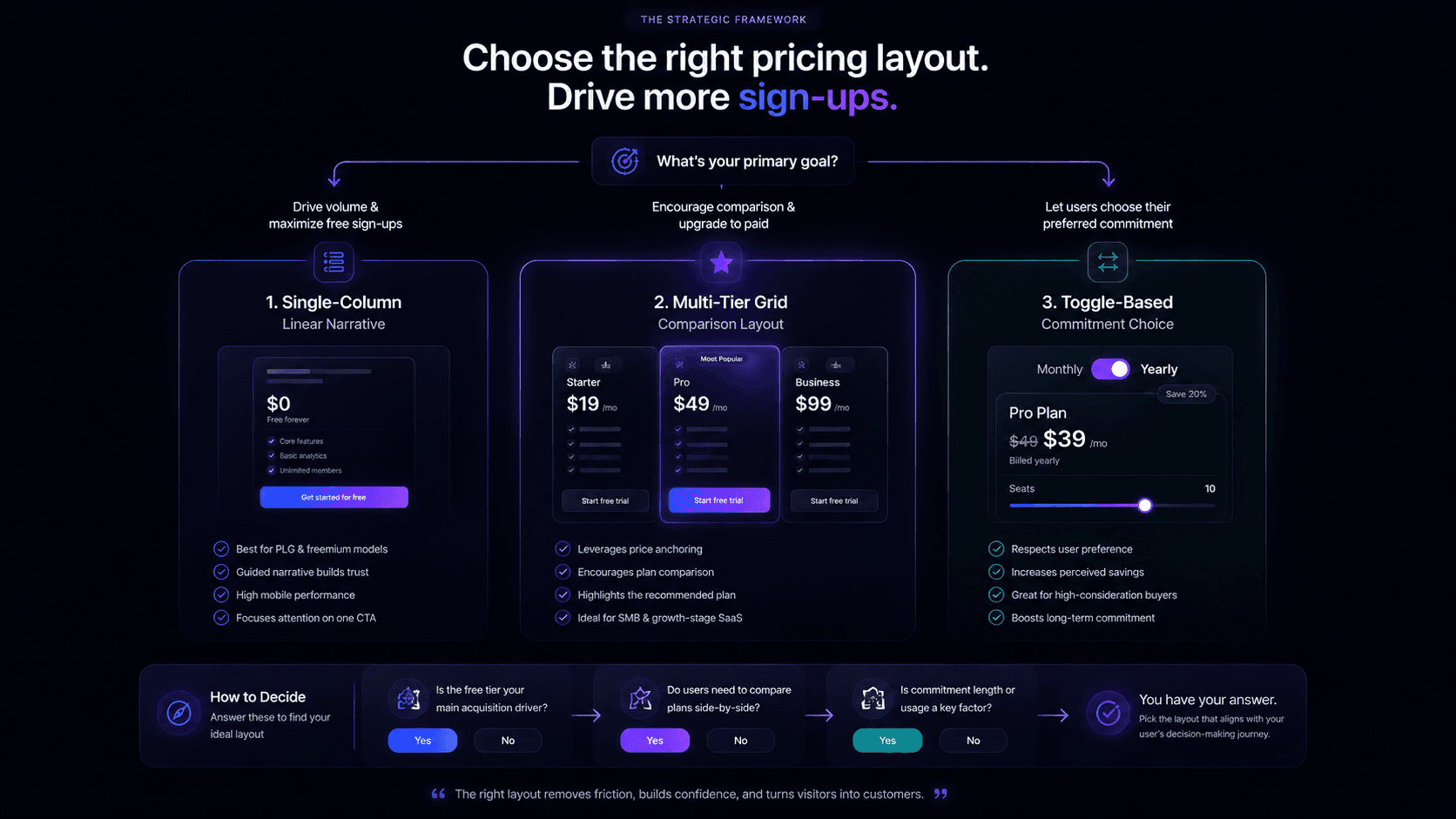
This guide breaks down the three dominant SaaS pricing page layout patterns — single-column, multi-tier, and toggle-based — with the UX psychology behind each, real-world examples that use them well, and a clear framework for choosing the right structure for your product.
Why Layout Matters More Than Copy (and Almost as Much as Price)
Before comparing layouts, it helps to understand what a pricing page visitor is actually doing.
They are not reading. They are scanning, comparing, and anchoring. Research in behavioral economics shows that humans evaluate options relationally, not absolutely. The price of your Pro plan does not feel expensive or cheap in isolation — it feels expensive or cheap relative to what is next to it.
This is why layout is a conversion lever. A three-column grid forces horizontal comparison. A single-column stacks attention vertically and guides users through a narrative. A toggle adds a decision moment that pre-qualifies the visitor's intent.
Every structural choice you make on a pricing page is, functionally, a persuasion choice.
Layout 1 — The Single-Column (Linear Narrative) Design
What It Is
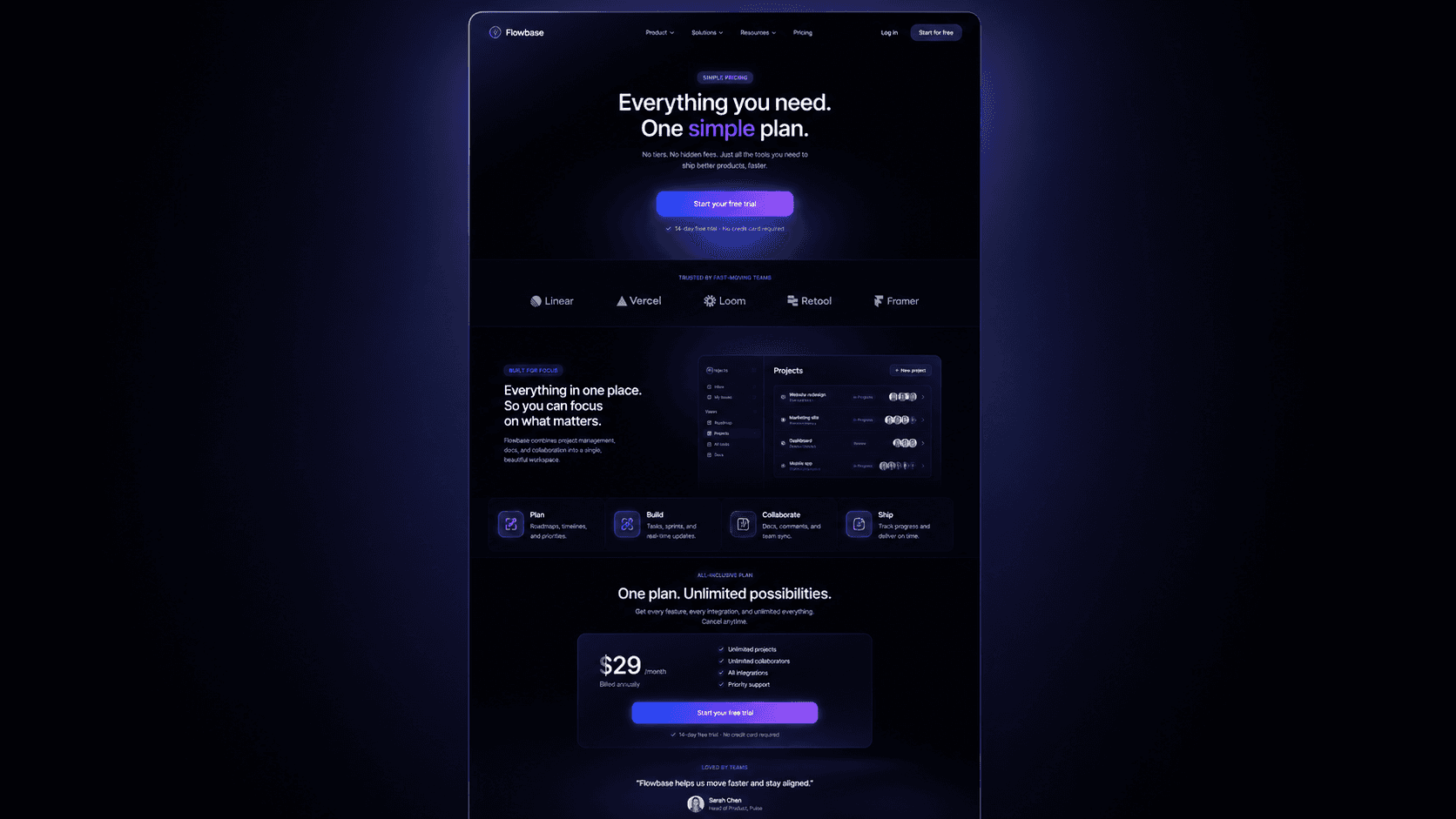
A single-column pricing page presents pricing information vertically, in one linear flow. Rather than showing three or four tiers side by side, it walks the visitor through context, value framing, and then pricing — often with one primary CTA dominating the page.
When to Use It
One-product or single-plan tools — Calendly's early design, Loom's freemium model
Usage-based pricing where tiers are not the organizing principle
Product-led growth (PLG) tools where the free tier is the hero and upsell happens in-app
Landing page + pricing hybrid — common for early-stage AI tools that need to justify value before revealing price
The UX Psychology at Work
The Funnel Effect. Single-column designs create a reading tunnel. Visitors cannot comparison-shop horizontally, so instead they read downward, consuming your value proposition as they go. By the time they reach the price, they have already been primed with benefits, social proof, and use-case framing. The price lands in a context you have constructed.
Commitment Escalation. Scrolling is a micro-commitment. The further someone scrolls, the more invested they feel. A single-column layout exploits this: every section they pass through increases psychological investment in the outcome you are leading them toward.
Reduced Decision Paralysis. Barry Schwartz's Paradox of Choice is highly applicable to pricing. Single-column designs with one dominant CTA reduce the number of active decisions, which reduces anxiety, which increases conversion — particularly for price-sensitive or research-heavy buyers.
Real Examples
Loom (freemium model): Loom's pricing page historically used a simplified single-dominant-CTA structure for its free tier sign-up, leaning heavily on value framing above the fold. The "Get Loom for Free" button dominated; the paid tiers appeared below as an afterthought — intentionally. The goal was volume into the funnel, not immediate revenue capture.
Notion (early design): Notion's early pricing page was nearly single-column in feel — one obvious choice (Personal Free), with other tiers visible but not competing for attention. This matched their PLG strategy: get the user in, upgrade later.
Conversion Strengths
High top-of-funnel conversion (low friction to first CTA)
Strong for mobile — no horizontal scrolling or card truncation
Excellent for tools where "try free" is the real goal
Conversion Weaknesses
Weak for products where the buyer actively needs to compare feature sets
Does not leverage anchoring psychology as effectively as multi-tier layouts
Can feel underpowered for enterprise buyers who want to see full option sets
Layout 2 — The Multi-Tier (Column Grid) Design
What It Is
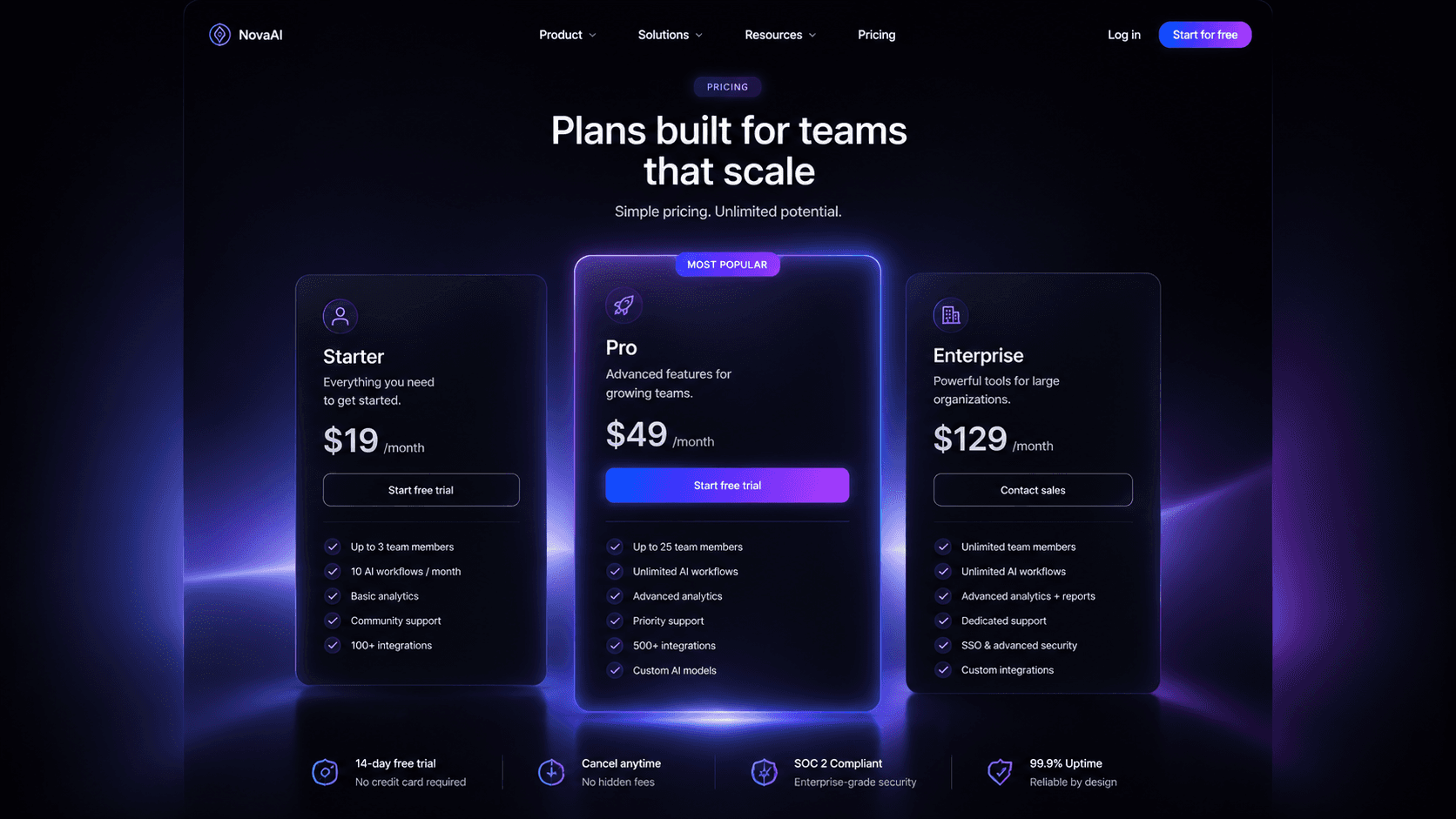
The most prevalent SaaS pricing layout. Two to four tiers displayed in a horizontal column grid, typically with a "Most Popular" or "Recommended" badge on the middle or second-from-right plan. Each column lists features, a price, and a CTA button.
When to Use It
Freemium-to-paid conversion funnels where you need to make the paid plan look attractive next to a free baseline
SMB to mid-market SaaS where buyers are actively comparing plans
Tools with meaningful feature differentiation between tiers — project management, CRM, email marketing
B2B products where multiple stakeholders review the pricing page (the champion shares a screenshot of the tier grid)
The UX Psychology at Work
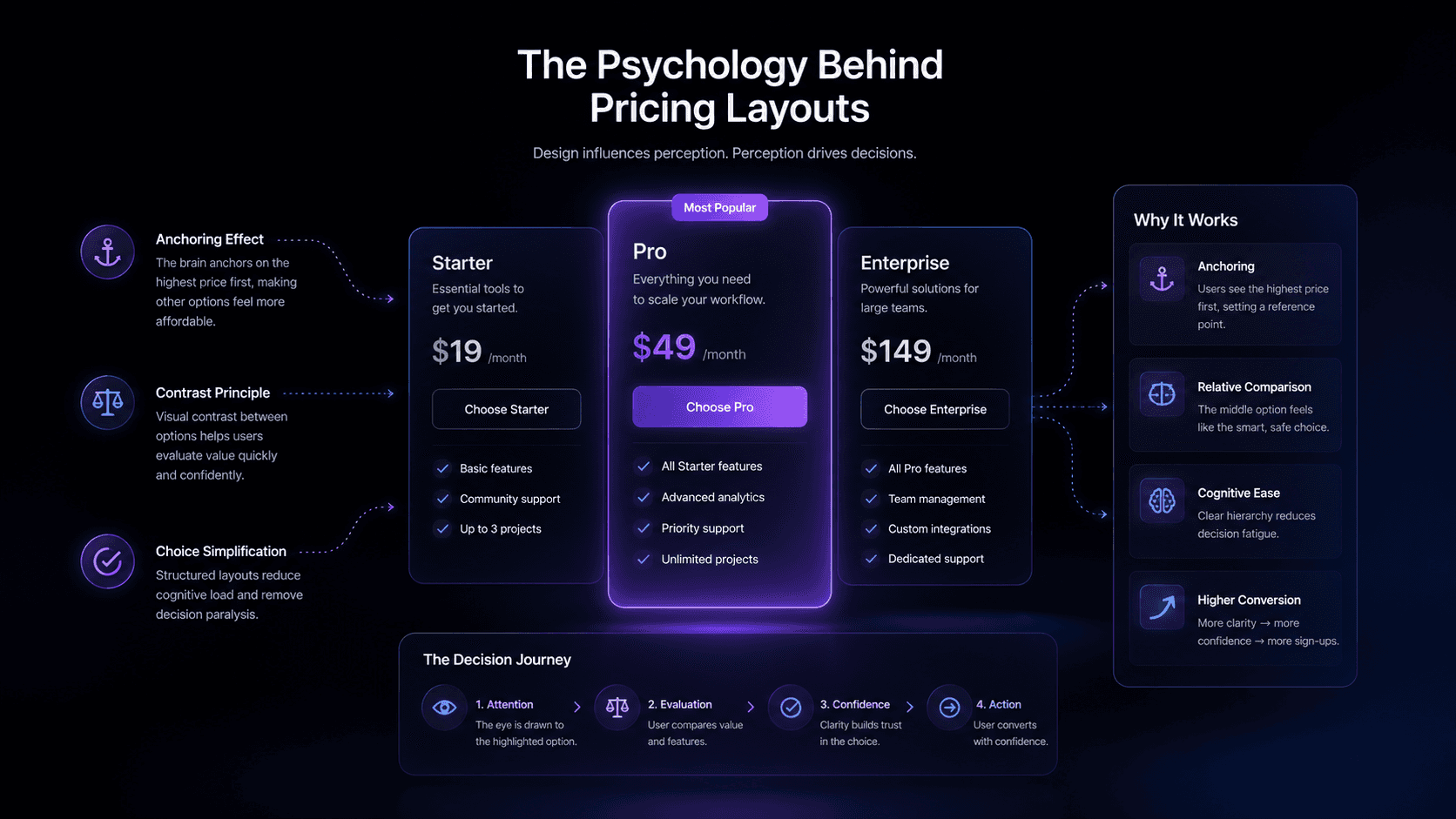
Price Anchoring. This is the most powerful psychological mechanism in a multi-tier layout. When you show a $199/month Enterprise plan next to a $49/month Pro plan, the Pro plan no longer costs $49 — it costs $49 relative to $199. The anchor makes the middle option feel like a bargain, even if $49 was always the intended target price.
The Goldilocks Effect (Compromise Effect). Research by behavioral economist Itamar Simonson shows that when presented with three options, people disproportionately choose the middle one. This is not because the middle is always the best value — it is because the middle option feels safe. It is neither the cheapest (which signals low quality) nor the most expensive (which signals over-commitment). SaaS founders who understand this deliberately engineer their "hero" tier as the middle option.
Visual Salience via Highlighting. The "Most Popular" badge does significant work. It is a social proof signal — others chose this — and a decision shortcut. It answers "what should I pick?" for visitors who are overwhelmed by the comparison task. This single UI element can shift 15–30% more clicks to the highlighted tier.
Feature Subtraction Psychology. The way you list features in a tier grid matters enormously. Greying out features that lower tiers do not have (rather than simply omitting them) makes the absence visible. Visibility of absence creates desire. The buyer's eye is drawn to the locked features, and the upgrade from Starter to Pro is no longer a cost decision — it is a loss aversion decision.
Real Examples
Linear: Linear's pricing page uses a clean three-column layout with a strong visual distinction between the free "Hobby" tier and the paid "Business" tier. The Enterprise column is present but de-emphasized visually, steering the majority of visitors toward Business. The page uses strong whitespace, crisp typography, and a deliberate color choice to make the paid column feel premium without feeling expensive.
Vercel: Vercel's pricing is a masterclass in three-column anchoring for a developer tool. The Hobby (free) tier is the left anchor; the Pro ($20/month) is the hero; Enterprise is the right anchor. The Pro tier column is visually elevated — slightly taller, with a subtle border or background distinction. The feature comparison below the fold reinforces the Pro choice without cluttering the above-the-fold cards.
Intercom: Intercom historically used a three-tier setup with the middle "Starter" plan front and center, flanked by modular add-ons — a hybrid approach showing how mature SaaS products evolve beyond the classic grid.
Conversion Strengths
Maximum leverage of anchoring and the compromise effect
Clear for buyers who want to self-serve a plan decision
Strong for B2B tools where the share-ability of the tier grid matters
Allows social proof ("Most Popular") to do real CRO work
Conversion Weaknesses
Mobile layout challenges — horizontal columns stack awkwardly on small screens
Can create comparison paralysis if feature lists are too long or visually dense
The "Most Popular" badge is widely understood; sophisticated buyers may discount it
Layout 3 — The Toggle-Based (Dynamic Switching) Design
What It Is
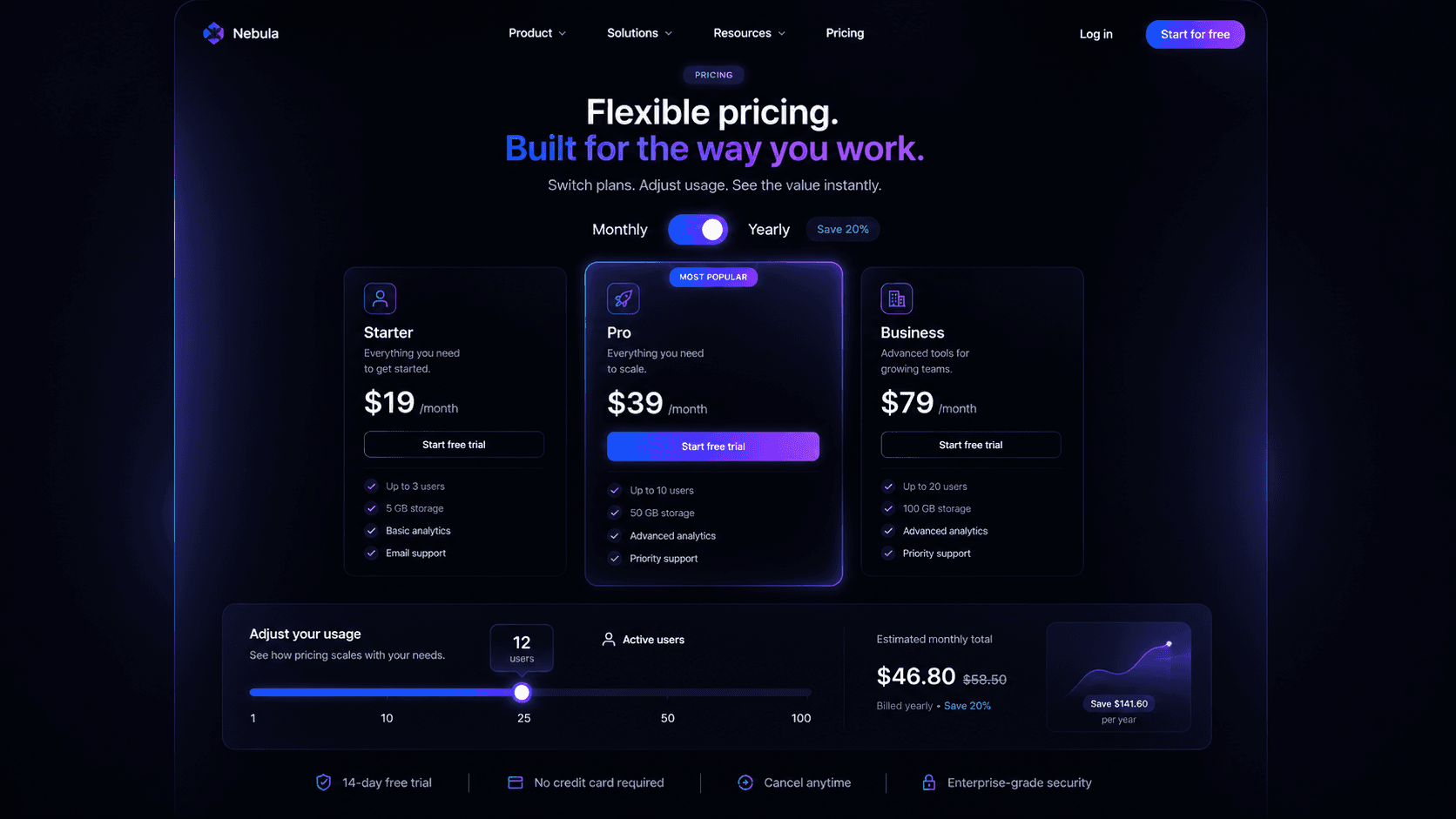
A toggle-based pricing page presents one set of pricing that dynamically updates based on a user input — most commonly a monthly/annual billing toggle, but in 2026, increasingly also a team size slider, a usage tier selector, or a use-case toggle ("For Individuals / For Teams / For Agencies").
When to Use It
Products with meaningful annual discount incentives (20–40% off) where you want to surface that saving actively
Usage-based or seat-based pricing where the buyer needs to model their own cost
Products targeting multiple buyer personas who have different needs and vocabulary
Any SaaS tool where interactive engagement correlates with intent — the act of interacting with the pricing page is a behavioral signal of high purchase intent
The UX Psychology at Work
The Endowment Effect and Active Participation. When a visitor moves a slider or flips a toggle, they are no longer passively reading — they are configuring. This is psychologically significant. The moment someone inputs their team size into a pricing slider, they are mentally simulating ownership. The price they arrive at feels personal and specific rather than abstract. This active participation increases perceived value of the resulting plan.
Loss Framing on the Annual Toggle. The annual toggle is one of the most effective loss-framing tools in SaaS pricing UX. When the page defaults to Monthly and the user sees "Save 33%" on the Annual toggle, the calculation inverts: staying on monthly no longer feels neutral — it feels like leaving money on the table. The toggle converts a price into a saving, and savings feel different from prices in the human brain.
Persona Qualification at Zero Friction. A use-case toggle ("For Individuals / For Teams") does something powerful: it lets the visitor self-segment. When a buyer clicks "For Agencies," the page reorganizes to show agency-relevant features, pricing, and language. This is not just personalization — it is a removal of irrelevant cognitive load. The visitor only sees what is relevant to them, which accelerates the path to decision.
Progressive Disclosure. Sliders that reveal pricing dynamically create a form of progressive disclosure: the visitor only commits to seeing the price for the volume they are considering. There is no sticker shock from seeing the $2,000/month enterprise row in a static table. Instead, they arrive at a number that reflects their situation, which makes the number feel fair.
Real Examples
HubSpot: HubSpot's pricing page is one of the most sophisticated toggle-based designs in SaaS. It combines a product toggle (Marketing / Sales / Service / CMS), a tier toggle (Starter / Professional / Enterprise), and an annual/monthly billing toggle — three nested toggle dimensions. The interactivity gives the visitor a sense of control; the structure gives HubSpot enormous ability to surface the right plan for each persona.
Webflow: Webflow uses both a monthly/annual toggle and a plan-type toggle (Site Plans / Workspace Plans), with the default state chosen to maximize the annual plan visibility. The page is a quiet lesson in toggle-as-funnel-design: each toggle interaction is a micro-qualification event.
Framer: Framer's own pricing page (naturally) uses a monthly/annual toggle with a visible "2 months free" saving callout. The toggle is not buried — it is prominent, above-the-fold, next to the plan cards. This placement is deliberate: the first action a visitor can take is to unlock savings, which creates a positive association with the page before they have read a single feature.
Slack: Slack's usage-based pricing page historically used a seat calculator model — enter your team size, see the monthly cost. This approach was particularly effective because the number that resulted always felt specific and justified: "this is what Slack costs for us," not "this is what Slack costs."
Conversion Strengths
Highest engagement rate of any pricing layout type
Interactive sliders and toggles pre-qualify high-intent visitors
Annual toggle is one of the most ROI-positive single UI elements in SaaS pricing CRO
Persona toggles reduce bounce by making the page feel specifically relevant
In 2026, AI crawlers and LLMs used for vendor research respond well to pages with structured, clearly-labeled pricing sections — the semantic clarity of toggle-based pages benefits GEO (Generative Engine Optimization)
Conversion Weaknesses
Higher design and development complexity — requires thoughtful interaction states, animation, and edge-case handling
If the slider or toggle logic is confusing, it erodes trust rather than building it
A/B testing is more complex when pricing itself changes dynamically
Performance and accessibility require careful implementation
Choosing the Right Layout: A Decision Framework
Signal | Recommended Layout |
|---|---|
Single product, freemium, PLG motion | Single-column |
2–4 tiers with clear feature differentiation | Multi-tier column grid |
Annual/monthly discount to promote | Toggle (billing period) |
Multiple buyer personas | Toggle (use-case) |
Seat-based or usage-based pricing | Toggle (slider) |
Mobile-first audience | Single-column or stacked multi-tier |
Enterprise buyers, complex procurement | Multi-tier + detailed comparison table below |
Early-stage, validating willingness to pay | Single-column with one CTA |
The Elements That Every Layout Shares
Regardless of which structural approach you use, the highest-converting pricing pages in 2026 share a set of core conversion elements:
1. A Value Headline, Not a Feature Headline "Plans that scale with your team" outperforms "Choose a plan" because the former frames pricing as a solution, not a transaction. The headline above your pricing grid should speak to outcome, not product.
2. Social Proof at the Decision Moment Customer logos, user counts, or a short testimonial positioned directly above or within the pricing section — not relegated to a separate section — reduces anxiety at the highest-friction point of the page. "Trusted by 12,000 SaaS teams" placed just above the pricing cards is more valuable than the same line in the hero banner.
3. A Dominant "Hero" Tier Whether through visual elevation (border, background, size), a "Most Popular" badge, or a default toggle state, every high-converting pricing page signals a preferred option. Visitors without strong preferences (the majority) will follow this signal.
4. Risk Reversal Language "No credit card required," "Cancel anytime," "14-day free trial" — these phrases are most powerful when placed immediately adjacent to the CTA button, not in the page footer. Their job is to neutralize the last psychological barrier before the click.
5. A Visible FAQ Section Common objections — "What happens when my trial ends?" "Can I change plans later?" "Is there a discount for nonprofits?" — when answered directly on the pricing page, reduce support contact volume and eliminate the bounce that happens when a visitor leaves to search for an answer.
6. Enterprise/Custom Escape Valve Even if 90% of your customers choose self-serve plans, the absence of a "Talk to Sales" or "Custom pricing" path can cause enterprise decision-makers to bounce. They need to see that an alternative exists, even if they never use it. Its presence signals legitimacy and scale.
What 2026 Has Changed About SaaS Pricing Page Design
Several shifts in the last 12–18 months have meaningfully affected what works on pricing pages:
AI-Powered Vendor Research Changes Discovery. A significant portion of SaaS buyers in 2026 first encounter your pricing through an AI assistant (ChatGPT, Perplexity, Gemini) rather than Google. These systems summarize and compare pricing from multiple vendors. Pages with clear, structured, semantically labeled pricing tiers — where plan names, prices, and key features are clearly delineated — are more likely to be accurately represented and favorably positioned in AI-generated vendor comparisons. This is a new, practical argument for clean layout structure over clever visual design tricks that obscure the underlying data.
Interactivity Signals Intent More Than Pageviews. With third-party cookie deprecation largely complete, behavioral analytics now lean heavily on engagement signals. A visitor who interacts with a pricing slider or toggles between billing periods is an extremely high-intent signal for retargeting, sales alerts, or automated in-app nudges. The interactive pricing page has become part of the intent-capture infrastructure, not just the UX.
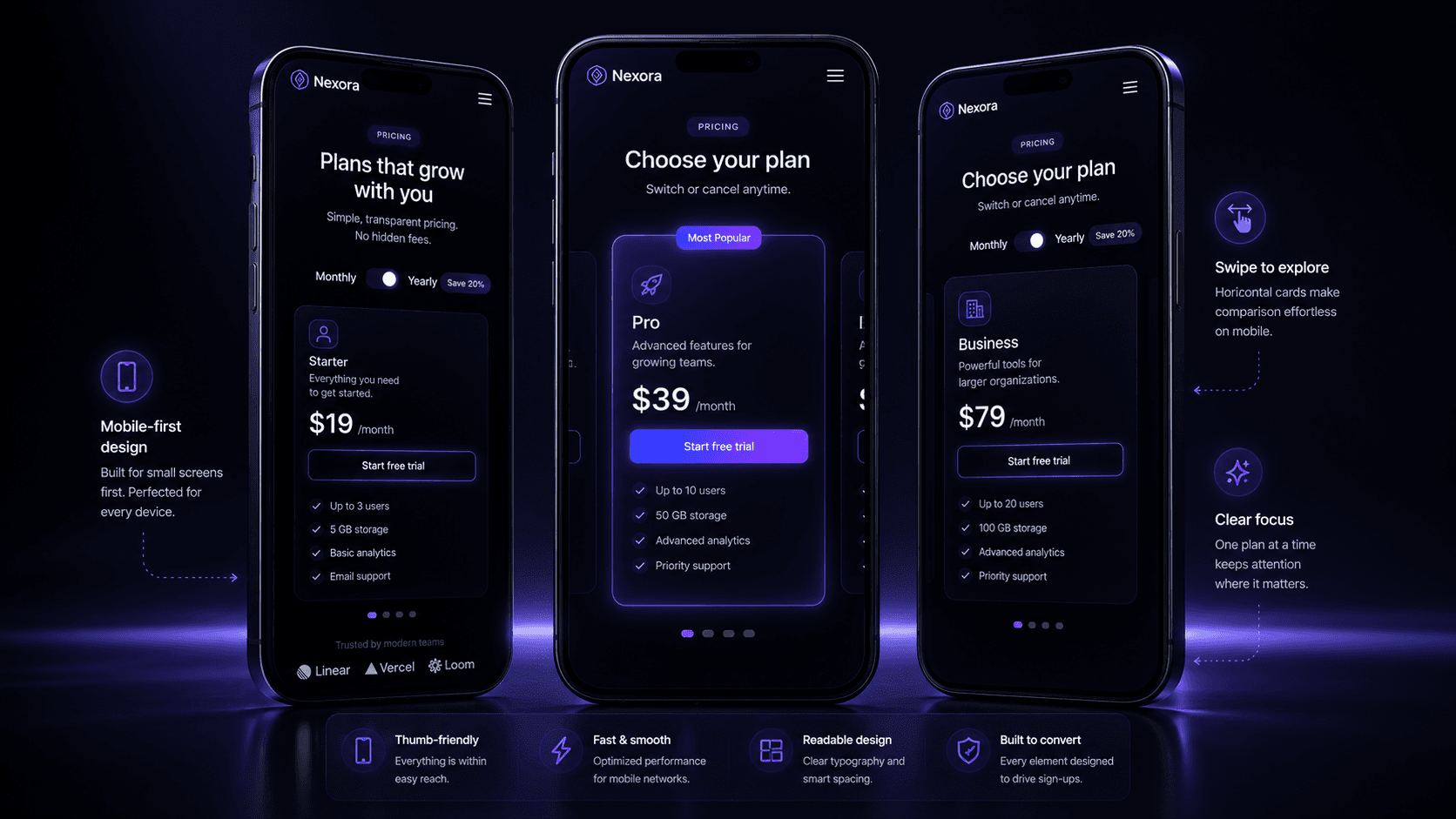
Mobile Parity Is Now Table Stakes. In 2024–2025, multiple SaaS analytics reports confirmed that 30–45% of SaaS pricing page traffic originates from mobile devices, even for B2B tools. Horizontal column grids that collapse awkwardly on mobile are no longer acceptable. The best layouts in 2026 are designed mobile-first, with horizontal grids only appearing at tablet breakpoints and above.
Personalization at the Layout Level. A growing number of SaaS tools are using UTM parameters, intent data, or reverse IP lookup to personalize which pricing tier is highlighted or which toggle state is default when a visitor lands. A visitor arriving from a "small business CRM" keyword sees a different default state than one arriving from "enterprise sales automation." This is layout personalization, and it is increasingly accessible without custom engineering.
How IFEMON Studio Designs Psychology-Driven Pricing Pages in Framer
Most pricing pages are designed like templates. Pick a layout from a library, drop in your content, publish. The result is a page that looks like every other pricing page — which means it converts like every other pricing page.
At IFEMON Studio, pricing page design is treated as conversion architecture. Every structural and interactive decision is made in service of a specific psychological outcome.
Here is what that looks like in practice when building in Framer:
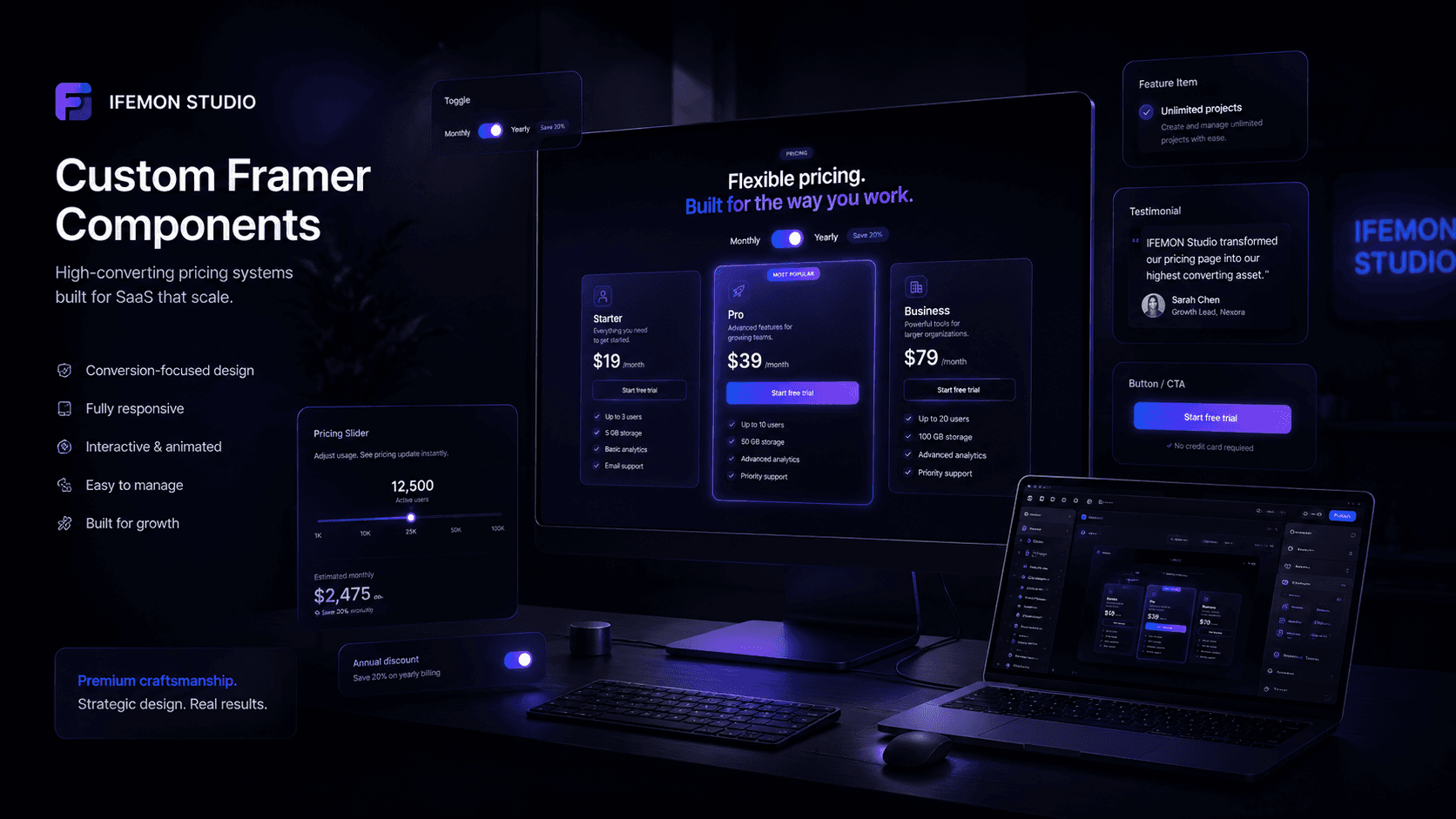
Custom Interactive Pricing Sliders
Static tier cards tell visitors what something costs at fixed intervals. A custom pricing slider built in Framer lets visitors arrive at their price — which, as described above, activates the endowment effect and creates personal ownership of the number.
IFEMON Studio builds these sliders with:
Smooth easing and haptic-feel motion — the slider should feel precise and responsive, not jumpy. In Framer, this means custom spring physics on the value transitions, not a default HTML range input
Real-time price computation — the displayed price updates as the slider moves, with a micro-animation (count-up or fade-transition) that makes the change feel dynamic rather than static
Contextual callouts — at key breakpoints ("For teams over 10, you save 22% vs monthly"), a tooltip or inline message appears, adding a conversion moment at the exact decision threshold
Psychological Tier Elevation in the Column Grid
When IFEMON Studio builds a multi-tier pricing section in Framer, the "hero" tier is not elevated with a simple border. Instead, the elevation is architectural:
Slight Y-axis scale increase (103–105%) on the recommended card
A soft shadow with a brand-colored tint — not black, not grey
A subtle background fill that uses a glass-morphism or layered gradient treatment, distinct from the neutral cards on either side
The "Most Popular" badge is custom-designed, not a generic pill — it might be a corner ribbon, an animated indicator, or an inline icon treatment that fits the product's visual language
These choices are calibrated: the hero card must feel premium but not aggressive. The goal is confident recommendation, not hard sell.
Annual Toggle with Loss-Framing Animation
The annual/monthly toggle in an IFEMON Studio build is designed to make the saving felt, not just read.
When a visitor flips from Monthly to Annual:
The price animates downward — a count-down number transition, not a static swap
A "You save $X per year" callout fades in below the price with a brief highlight
The CTA button text optionally updates ("Start saving now" vs "Start free trial")
This sequence takes approximately 400ms. In that 400ms, the visitor has experienced a price drop, quantified a saving, and received a new CTA that reframes the action. That is a complete micro-conversion moment — entirely contained within a toggle interaction.
Persona-Segmented Toggle States
For SaaS products with distinct buyer personas (Freelancer / Startup / Agency, or Individual / Team / Enterprise), IFEMON Studio builds persona toggles that do more than swap prices.
When the toggle state changes:
Feature copy updates to reflect persona-relevant language ("Unlimited clients" for Agency; "Up to 5 seats" for Startup)
Social proof swaps — testimonials or logos shown are filtered to that persona's industry or company size
The recommended tier may shift — what is "Most Popular" for Freelancers is not what is "Most Popular" for Agencies
This is full-component state management in Framer — using CMS-linked overrides and conditional visibility to create what feels like a personalized pricing page with no backend engineering required.
Accessibility, Performance, and Mobile-First Architecture
Every pricing component built by IFEMON Studio ships with:
Full keyboard navigation on toggles and sliders
ARIA labels that communicate the current state to screen readers
Touch-optimized slider handles sized to 44×44px minimum tap targets
Lazy-loaded feature comparison tables that do not delay the above-the-fold pricing cards
Responsive breakpoint logic that transitions the column grid to a swipeable card carousel on mobile, preserving the comparison behavior without requiring horizontal scroll
A Note on AI-Optimized Content Structure for Pricing Pages
If you are a SaaS founder reading this and thinking about how AI search tools represent your pricing, here is a practical checklist for your pricing page's underlying structure:
Name your plans explicitly and consistently — "Starter," "Pro," "Enterprise" should appear as visible text, not just as styled headers in an image
State the price in plain text — "$49/month" or "$49 per month billed annually" — not just as a styled number inside a component that an AI crawler cannot read
List your top 3–5 features per plan as text — not only as icons or checkmarks. Feature names as readable text allow AI systems to summarize your offering accurately
Include an FAQ section with structured Q&A — this is one of the highest-value sections for both human conversion and AI indexing, as questions like "What is included in the Pro plan?" are exactly what AI assistants search for and surface
Use descriptive anchor links —
pricing#pro-planallows direct citation from AI-generated responses comparing your product to competitors
Summary: Matching Layout to Strategy
The best pricing page layout in 2026 is not the most sophisticated one. It is the one that matches your product's go-to-market strategy, your buyer's decision-making pattern, and your conversion goal.
If your goal is volume into a free tier, use single-column. Remove friction. One CTA. Fast.
If your goal is self-serve plan selection, use multi-tier. Three columns. Engineer the middle tier as the hero. Use anchoring.
If your goal is annual plan conversion or persona qualification, use toggles. Make the saving felt. Make the interactivity earn its complexity.
If your goal is enterprise deal generation, add a fourth layout layer: the detailed comparison table below the cards, and a prominent "Talk to Sales" path.
And if you want a pricing page that goes beyond static layout conventions — one where the structure, motion, and interaction design are doing active psychological work — that is the kind of component IFEMON Studio designs and builds.
Summary: Matching Layout to Strategy
The best pricing page layout in 2026 is not the most sophisticated one. It is the one that matches your product's go-to-market strategy, your buyer's decision-making pattern, and your conversion goal.
If your goal is volume into a free tier, use single-column. Remove friction. One CTA. Fast.
If your goal is self-serve plan selection, use multi-tier. Three columns. Engineer the middle tier as the hero. Use anchoring.
If your goal is annual plan conversion or persona qualification, use toggles. Make the saving felt. Make the interactivity earn its complexity.
If your goal is enterprise deal generation, add a fourth layout layer: the detailed comparison table below the cards, and a prominent "Talk to Sales" path.
And if you want a pricing page that goes beyond static layout conventions — one where the structure, motion, and interaction design are doing active psychological work — that is the kind of component IFEMON Studio designs and builds.
Work With IFEMON Studio
IFEMON Studio specializes in high-converting Framer websites for AI and SaaS startups. Pricing pages, landing pages, and interactive component systems — designed with conversion psychology and built for performance.
View work & start a project → ifemon.com

EMON
Founder IFEMON Studio
Published by IFEMON Studio, Dhaka — Web Design Partner for AI & SaaS Startups Worldwide. Topics: SaaS pricing page design, Framer components, conversion rate optimization, SaaS UX, pricing page layout, interactive pricing slider, SaaS landing page design 2026
More to explore
Show Projects